Joined: 21 Dec 2015
Online Status: Offline
Posts: 10
Topic: Show loop iterations in details line Posted: 03 Mar 2016 at 6:35am
Hello!
I am trying to get a report to show a detail line for each loop.
To start simply, I want for every employee I want 59 details lines, with each showing consecutive numbers. Once I've got this part working I can *hopefully* do the rest fairly easily. I've tried the following:
Local NumberVar test := 0;
Local NumberVar i;
For i := 1 To 59 Do
(
Local NumberVar test := test+1;
);
test;
but just get the final iteration of 59. Which is great because it's showing the loop is working - just not how I want it to!
Joined: 21 Dec 2015
Online Status: Offline
Posts: 10
Posted: 04 Mar 2016 at 12:30am
I'm trying to make a P & L report to export to CSV for a client. Each of the 59 lines will show a description, nominal code, and amount. The amounts are pulled in from multiple tables and company policy means I cannot just make a new table.
I then need to supress lines equal to 0, ideally without blank lines in the CSV.
My attempt this morning was to use multiple details sections which are conditionally suppressed, but that then causes blank lines in the CSV export.
Joined: 19 Dec 2008
Online Status: Offline
Posts: 9053
Posted: 04 Mar 2016 at 2:47am
Why '59 lines'?
Because you have 59 unique 'items'?
Using multiple tables is quite common. You can either use a command or a stored procedure (if your company allows it) to create a data set that compresses your tables into one acceptable data source. Or you can usually use grouping in Crystal to replicate that. You then suppress the detail rows and use the group header or footer to show summarized data from that group.
Joined: 21 Dec 2015
Online Status: Offline
Posts: 10
Posted: 07 Mar 2016 at 5:01am
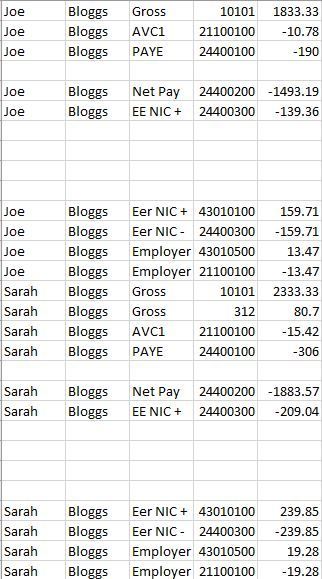
I've found a way to filter the report so pay components are filtered if they are 0 - it's just the other bits (Tax, National Insurance, Pensions etc.) which are pulled in from a different table which are more complicated.
Joined: 19 Dec 2008
Online Status: Offline
Posts: 9053
Posted: 08 Mar 2016 at 4:31am
I am not clear on what your 'raw' data set looks like but do not fall into the trap of thinking that displaying the data to look like something (a desired output) actually alters the data set at all. Crystal never alters your data, it just changes the way you are displaying it to the eye of the report recipient. It is important to keep that in mind while working the design process as you can start o trick yourself into thinking that you have data to use that is not "real" data.
From the looks of it you might be able to group on person and then group on type and then sum the value for that group and exclude (or suppress) the entire group based on that group value result.
You cannot post new topics in this forum You cannot reply to topics in this forum You cannot delete your posts in this forum You cannot edit your posts in this forum You cannot create polls in this forum You cannot vote in polls in this forum



 IP Logged