Report Design
 Crystal Reports Forum : Crystal Reports 9 through 2022 : Report Design
Message Icon Topic: Help ! Dynamic datasouce using .ttx file - how ? Post Reply Post New Topic
Author Message
justicenzy
Newbie
Newbie
Avatar

Joined: 08 Aug 2011
Location: Vietnam
Online Status: Offline
Posts: 3
Quote justicenzy Replybullet Topic: Help ! Dynamic datasouce using .ttx file - how ?
     Posted: 08 Aug 2011 at 4:59pm

Please help me resolve this problem

VS 2010 , C#

I using .ttx file for datasource like below pic , when run report at local ( my pc ) , everything is fine .


But when run at another pc , report can't find out directiory of ttx file because it is absolute directory

So it pop up a login panel  like this
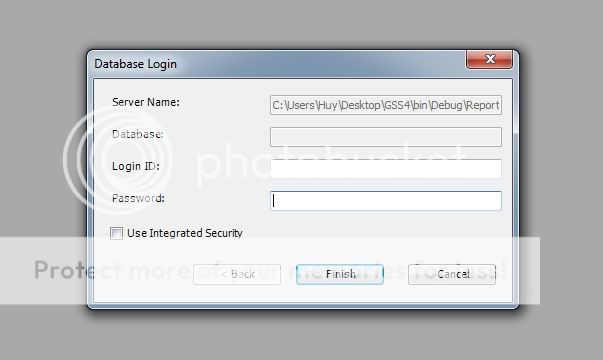


then how i can set a dynamic directory for .ttx to make it work fine for all client

Note: this problem is not occur when using Delphi


Edited by justicenzy - 08 Aug 2011 at 5:02pm

Huy
IP IP Logged
justicenzy
Newbie
Newbie
Avatar

Joined: 08 Aug 2011
Location: Vietnam
Online Status: Offline
Posts: 3
Quote justicenzy Replybullet Posted: 08 Aug 2011 at 9:54pm
Yeah , i found out solution , i changed connection info , like this :


TableLogOnInfo T = rptDoc.Database.Tables[0].LogOnInfo;
T.ConnectionInfo.ServerName = DBase.str_AppPath + "Report\\OpsContainerDischarge.ttx";
T.ConnectionInfo.LogonProperties[0] = new NameValuePair2("Field Definition File", DBase.str_AppPath +  "Report\\OpsContainerDischarge.ttx");

 rptDoc.Database.Tables[0].ApplyLogOnInfo(T);


Edited by justicenzy - 08 Aug 2011 at 9:55pm
Huy
IP IP Logged
Printable version Printable version

Forum Jump
You cannot post new topics in this forum
You cannot reply to topics in this forum
You cannot delete your posts in this forum
You cannot edit your posts in this forum
You cannot create polls in this forum
You cannot vote in polls in this forum