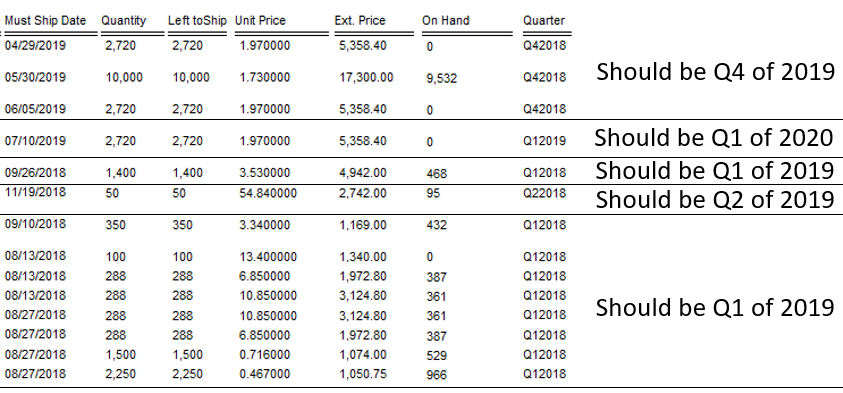
Hello,
I have a date field called {RELEASES.MUST_SHIP_DATE}
I need a formula to tell me which Quarter and which year does it fall under.
our fiscal year start to end are July 1st to June 31st.
So now that we are in August of 2018, we are in Q1 2019.
August of 2017 was Q1 2018. and so on...
How do I go about making this?
I created a formula to display the month name (called {@Month Name}) and then created an "if" formula for the following:
if {@Month Name} in ["January", "February", "March"] then "Q3"
else if {@Month Name} in ["April", "May", "June"] then "Q4"
else if {@Month Name} in ["July", "August", "September"] then "Q1"
else "Q2"
I need a formula to display the fiscal year of the must ship date field and then I can just make a formula to combine the Quarter + " " + Year and I'll be golden
Thanks!!