

Chapter 2 - Learning the Report Designer
See how to set the designer's properties and how to setup the report's basic structure. Secondly, you learn how to add and manipulate report objects within the designer. The tutorials give you practice creating and modifying the many report objects.
 Become a Crystal Reports expert with the authoritative resource available.
The tuturials and tips in this book will take your skills to the next level.
Become a Crystal Reports expert with the authoritative resource available.
The tuturials and tips in this book will take your skills to the next level.Buy at

This is an excerpt from the book Crystal Reports Encyclopedia.
Click to read more chapter excerpts.
How To Format Strings
The tutorials earlier in the chapter showed you different ways to format a text object. But it didn't discuss all the different formatting options available. The Format Editor has many more options for modifying the way string based report objects appear. The different formatting options are available for textbox objects as well as formulas, report fields, and special fields. Access the formatting dialog box by right-clicking on the field and selecting Format.The first tab of the Format Editor dialog box is the Common tab (see Figure 2-19). The properties shown on this tab are common to most of the report objects available. These properties are described in Table 2-3.
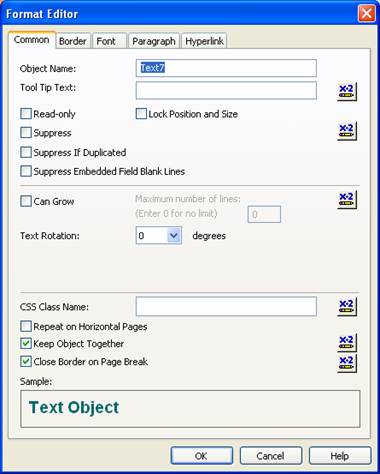
Figure 2-19. The Common tab of the Format Editor dialog box.
Almost every option has a Formula Workshop button associated with it. This lets you apply custom formatting to the object using formulas. This is discussed in more detail in Chapter 5.
To read all my books online, click here for the Crystal Reports ebooks.